Build an atomic sliding-window rate limiter in Redis and Lua
Most Redis rate-limiter tutorials embed the Lua in a Node or Python client. Here's the atomic sliding-window version — and how to run it at the edge in OpenResty, where a limiter belongs.

Sorower
Co-founder

In this article
- The race your naive limiter loses
- Why Lua: one script, nothing interleaves
- The atomic sliding-window rate limiter, in Lua
- Run it and watch it
- Now run it where a limiter belongs: the edge
- The clock trap nobody warns you about
- When the log eats your memory
- Returning the right 429
- Where ReqKey fits (and where it doesn't)
- Key takeaways
Your rate limiter worked perfectly in dev. One tab, one curl loop, the counter ticked up, the 429s came back on cue. Then it met production traffic — a hundred requests landing in the same 20 milliseconds — and a client who was supposed to get 100 requests a minute quietly got 140. Nobody paged you; the limiter just… leaked. Ask me how I know.
This is a build guide for a sliding-window rate limiter in Redis and Lua that doesn't leak under concurrency — the atomic version — plus the part almost every tutorial skips: how to run it at the edge in OpenResty, where a limiter actually belongs. We'll reproduce the exact race the naive limiter loses, fix it in a single EVAL, wire it into an nginx request path, and talk honestly about the two things that bite you later: clock skew and memory.
Here's a bold claim to start with, because it's true: almost every "rate limiter" written in application code is a race condition with good intentions. Let's see why.
The race your naive limiter loses
The textbook limiter is two Redis commands: read the count, and if there's room, bump it.
# The naive limiter — two round trips. DO NOT SHIP THIS.
# Limit: 5 requests per window, key per consumer.

count = GET rl:consumer_42          # returns "4"
if tonumber(count or 0) < 5 then
    INCR rl:consumer_42             # -> 5, request allowed
else
    reject(429)
end
Read it slowly and you'll spot the gap. Between the GET and the INCR there's a window where another request can run. Two requests arrive together, both GET and see 4, both check 4 < 5, both decide they're allowed, and both INCR. The key ends at 6. Two requests admitted where exactly one slot remained.
This is a TOCTOU bug — time-of-check to time-of-use — and it gets worse exactly when it matters. At a quiet moment the odds of two requests interleaving are low. At the boundary of a traffic spike, when fifty requests hit the same key inside a few milliseconds, all fifty can read the same stale count and all fifty can pass. Your "5 per window" limit admits 55. The limiter didn't fail loudly; it failed silently, which is worse, because you'll find out from a bill or an incident, not a log line.
Question a real engineer asks: "Can't I just use INCR first and check the return value?" You can, and for a plain fixed-window counter that's genuinely race-free — INCR is atomic and hands back the post-increment value. But the moment you want a sliding window — prune old entries, count what's left, then decide — you're back to multiple commands and back to the race. You need all of it to happen with nothing running in between.
Why Lua: one script, nothing interleaves
Redis runs Lua scripts atomically. The whole script executes on the server as a single unit — no other command from any client runs between your script's first line and its last. That's the entire trick. Wrap read-decide-write in one EVAL call and the interleaving window disappears, because there's no longer a gap to interleave into.
People reach for MULTI/EXEC or WATCH first, and both fall short here. MULTI queues commands and runs them together, but it can't branch — you can't read a count and then decide whether to write, because every command is queued before any of them runs. WATCH adds optimistic locking, but under contention it aborts and retries, and a rate limiter's hot key is the most contended key you have. You'd be adding retries precisely where you can least afford them. Lua just runs the logic, once, in one round trip.
The atomic sliding-window rate limiter, in Lua
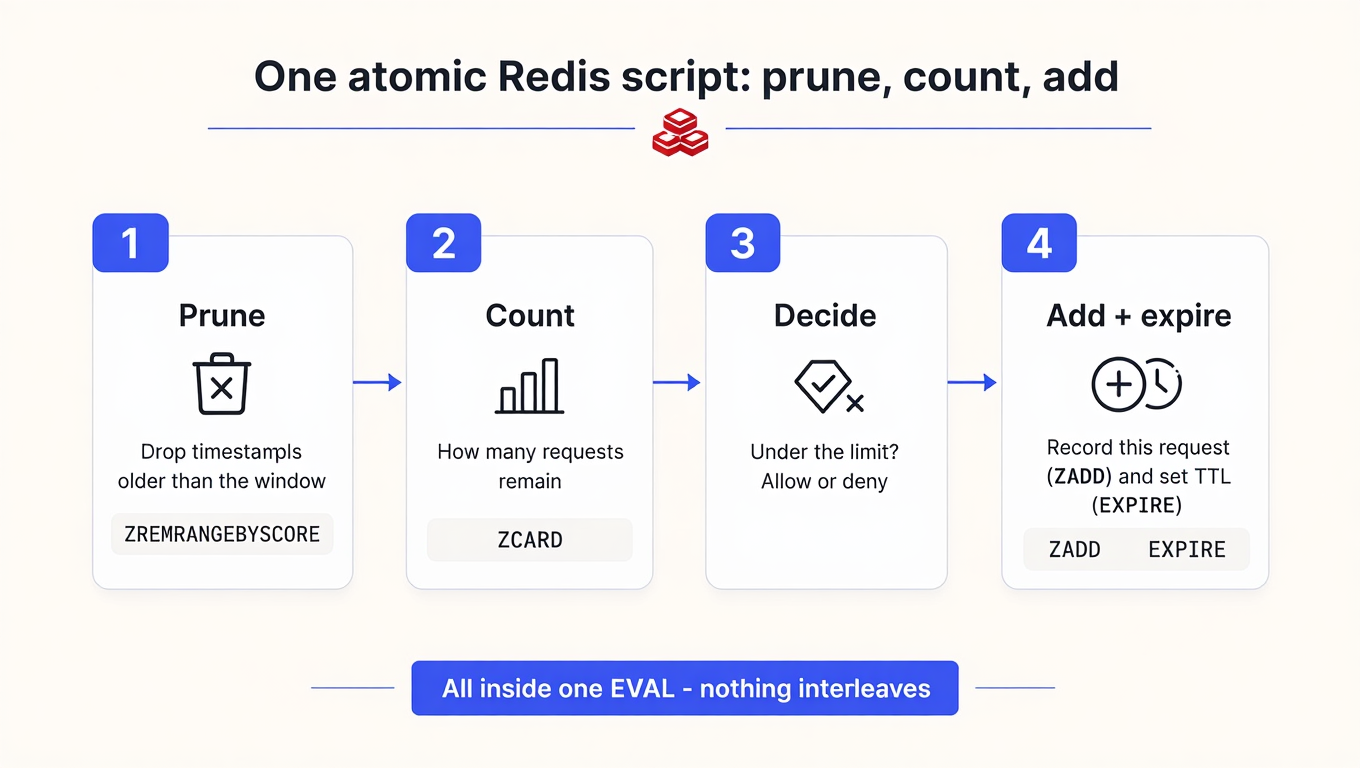
The exact approach: store one entry per request in a sorted set, scored by timestamp. On each request, drop everything older than the window, count what survives, and add the new request only if there's room. A true rolling window with no boundary bursts.
-- sliding_window.lua
-- KEYS[1] = bucket key, e.g. "rl:sw:consumer_42"
-- ARGV[1] = limit      (max requests per window)
-- ARGV[2] = window_ms  (window length, milliseconds)
-- ARGV[3] = now_ms     (caller's clock, milliseconds)
-- ARGV[4] = member     (a UNIQUE id for this request)

local key    = KEYS[1]
local limit  = tonumber(ARGV[1])
local window = tonumber(ARGV[2])
local now    = tonumber(ARGV[3])
local member = ARGV[4]

-- 1. Prune everything older than the window.
redis.call('ZREMRANGEBYSCORE', key, 0, now - window)

-- 2. Count what's left inside the window.
local used = redis.call('ZCARD', key)

if used < limit then
  -- 3. Room to spare: record this request, refresh the TTL.
  redis.call('ZADD', key, now, member)
  redis.call('PEXPIRE', key, window)
  return { 1, limit - used - 1, 0 }   -- { allowed, remaining, retry_after_ms }
end

-- 4. Over the limit: report exactly when a slot frees up.
local oldest = redis.call('ZRANGE', key, 0, 0, 'WITHSCORES')
local retry_after = window
if oldest[2] then
  retry_after = (tonumber(oldest[2]) + window) - now
end
return { 0, 0, retry_after }          -- { denied, 0 remaining, retry_after_ms }
Two design decisions in that script carry more weight than they look:
On a rejected request, we don't ZADD. This is deliberate and most copy-paste versions get it wrong. If you stamp denied requests into the set, a client that's hammering you keeps shoving fresh timestamps into the window — and the window's "oldest" entry never gets old, so it never recovers. You'd be punishing the client into a permanent 429. Count only what you admit.
The member has to be unique per request. Sorted sets key on the member, not the score. If two requests reuse the same member, the second ZADD just updates the score of the first — ZCARD stays at 1, and your limiter cheerfully waves everyone through. This is the single most common way a sliding-window limiter silently stops limiting. Generate a unique member per call (a request id, or timestamp plus a counter) and never let it collide.
Run it and watch it
Save the script and fire it from redis-cli. Note the unique member on each call (req-1, req-2, …) — that's not decoration, it's correctness.
# limit 5, window 10000ms; GNU date gives epoch-ms via %s%3N
NOW=$(date +%s%3N)
redis-cli EVAL "$(cat sliding_window.lua)" 1 rl:sw:demo 5 10000 "$NOW" req-1
# 1) (integer) 1   <- allowed
# 2) (integer) 4   <- 4 remaining
# 3) (integer) 0

# ... fire req-2 through req-5, remaining ticks 3, 2, 1, 0 ...

redis-cli EVAL "$(cat sliding_window.lua)" 1 rl:sw:demo 5 10000 "$(date +%s%3N)" req-6
# 1) (integer) 0      <- denied
# 2) (integer) 0
# 3) (integer) 8342   <- retry after ~8.3s, when req-1 ages out
That third return value is your Retry-After, computed honestly from when the oldest in-window request will fall off — not a guessed constant. Clients love you for it, because it turns "back off and hope" into "back off for exactly 8.3 seconds."
Now run it where a limiter belongs: the edge
Here's what the tutorials skip. A rate limiter that runs inside your application — after your framework has booted a request handler, opened a DB pool, and deserialized a body — is protecting the wrong side of the wall. By the time application code says "429," you've already paid for most of the request. The limiter belongs at the edge, in front of your app, on the gateway.
OpenResty (nginx + Lua) is built for exactly this, and it's the same class of stack ReqKey runs its own edge validation on. Using lua-resty-redis, you can drop the limiter into an access_by_lua_block so it runs before the request ever reaches your upstream:
# nginx.conf — inside the location you want to protect
access_by_lua_block {
    local redis = require "resty.redis"

    local SCRIPT = [[
      local key    = KEYS[1]
      local limit  = tonumber(ARGV[1])
      local window = tonumber(ARGV[2])
      local now    = tonumber(ARGV[3])
      local member = ARGV[4]
      redis.call('ZREMRANGEBYSCORE', key, 0, now - window)
      local used = redis.call('ZCARD', key)
      if used < limit then
        redis.call('ZADD', key, now, member)
        redis.call('PEXPIRE', key, window)
        return { 1, limit - used - 1, 0 }
      end
      local oldest = redis.call('ZRANGE', key, 0, 0, 'WITHSCORES')
      local retry = window
      if oldest[2] then retry = (tonumber(oldest[2]) + window) - now end
      return { 0, 0, retry }
    ]]

    local red = redis:new()
    red:set_timeout(200)  -- ms. Never let a stalled Redis hang a request forever.

    local ok, err = red:connect("127.0.0.1", 6379)
    if not ok then
        -- Redis unreachable. Fail OPEN: let traffic through rather than 500 everyone.
        ngx.log(ngx.ERR, "ratelimit: connect failed: ", err)
        return
    end

    ngx.update_time()                          -- refresh nginx's cached clock
    local now    = math.floor(ngx.now() * 1000)
    local id     = ngx.var.http_x_consumer_id or ngx.var.remote_addr
    local key    = "rl:sw:" .. id
    local member = now .. "-" .. ngx.var.request_id   -- unique, no RNG seeding needed

    local res, eerr = red:eval(SCRIPT, 1, key, 100, 60000, now, member)

    -- Return the connection to the pool. Do NOT red:close() on the hot path.
    red:set_keepalive(10000, 100)

    if not res then
        ngx.log(ngx.ERR, "ratelimit: eval failed: ", eerr)
        return  -- fail open on a script error too
    end

    ngx.header["RateLimit-Limit"]     = 100
    ngx.header["RateLimit-Remaining"] = res[2]
    if res[1] == 0 then
        ngx.header["Retry-After"] = math.ceil(res[3] / 1000)
        return ngx.exit(429)
    end
    -- allowed: fall through to your upstream
}
Three production details in there that generic client-side tutorials never mention:
set_keepalive, notclose. Closing the socket on every request means a fresh TCP + Redis handshake on the next one — on your hottest path.set_keepalivereturns the connection to a per-worker pool so the next request reuses it. This is the difference between a limiter that adds sub-millisecond overhead and one that adds a connection setup.A real timeout.
set_timeout(200)means a sick Redis degrades your latency by 200ms, not by "forever." Pair it with a deliberate failure mode (below).ngx.var.request_idas the member. OpenResty hands you a unique request id for free — nomath.randomseedper worker, no collision anxiety.
Question you should answer before you deploy: "What happens when Redis is down?" The code above fails open — if Redis is unreachable, requests pass unlimited. That's the right call when your upstream can take the load and you'd rather not turn a Redis blip into a full outage. But a limiter that fails closed when Redis hiccups is a self-inflicted outage — every request 500s because the thing guarding your API fell over. Flip to fail-closed only when the backend you're protecting is more fragile than your Redis. Either way, decide it on purpose; don't let a timeout decide for you.
The clock trap nobody warns you about
Notice we pass now in from nginx. That's a choice with a real trade-off, and it's the kind of thing that works flawlessly on one box and gets weird on ten.
Passing the caller's clock makes the script deterministic and testable — you can feed it a fixed timestamp in a unit test and assert exact behavior. The cost: every edge node stamps requests with its own wall clock. Two gateways whose clocks drift 300ms apart will prune and stamp the same window slightly differently. Usually fine with NTP keeping nodes tight; occasionally the source of a bug you'll chase for a day.
The alternative is to read the clock inside the script with redis.call('TIME'), so every request in a window is judged against one authoritative clock — the Redis server's. On Redis 5.0+ this is allowed out of the box (effect-based replication is the default). On older Redis you'd hit Write commands not allowed after non-deterministic commands unless you opted into redis.replicate_commands() first. Yeah… no — clocks lie, and this at least makes them all lie the same way.
But — and this matters if you're multi-region — TIME only unifies the clock within one Redis. If you shard Redis per region (as a multi-region edge naturally does), us-east and us-west each have their own TIME, and you're choosing between per-region windows or accepting cross-region skew. There's no free lunch; there's just picking which imperfection you can live with.
When the log eats your memory
The sliding-window log is exact because it remembers every request. That's also its bill. The set holds one member per request in the window — a limit of 10,000 requests per hour means up to 10,000 members per client. Multiply by a million clients and your Redis becomes a memory graveyard.
When volume climbs, switch algorithms. Here's the honest trade table — the numbers that actually decide it, not a feature grid:
Approach | Memory per client | Accuracy | Boundary burst | Best for |
|---|---|---|---|---|
Sliding window log (this post) | O(n) — one sorted-set entry per request | Exact | None | Low/medium volume, high-value keys, audit trails |
Sliding window counter | 2 integer keys | Near-exact (weighted estimate) | Smoothed | High volume where memory matters |
Fixed window | 1 integer key | Approximate | Up to 2× | Simple limits, login throttling |
The sliding-window counter keeps two fixed-window counters and blends them with a weighted average — two integers instead of ten thousand timestamps, at the cost of being an estimate rather than an exact count. For general-purpose API limiting it's the right default. Reach for the log when exactness or an audit trail earns its memory; reach for the counter when a million clients don't.
Returning the right 429
A limiter that blocks correctly but responds badly still fails your customers. When you deny, return 429 Too Many Requests — not 403, not 503 — and include Retry-After with the real seconds until recovery (the third return value from our script). Add the IETF RateLimit header fields (RateLimit-Limit, RateLimit-Remaining) so well-behaved clients can self-throttle before they ever trip the limit. A good 429 turns a client's retry storm into an orderly back-off — which, incidentally, keeps your Redis quieter too.
Where ReqKey fits (and where it doesn't)
Let's be precise, because "rate limiting" and "quotas" get muddled constantly. A rate limiter caps instantaneous rate — requests per second. A credit or quota system caps total consumption — requests per month. They solve different problems, and you often want both: a rate limiter so one client can't spike your infrastructure this second, and credits so they can't quietly consume a year's worth of calls this week.
ReqKey's public API is deliberately credit-based — you validate a key and deduct from a consumer's pool with POST /key/validate:
curl -X POST "https://api.reqkey.com/key/validate" \
  -H "Authorization: Bearer reqkey_xxx..." \
  -H "Content-Type: application/json" \
  -d '{"key": "prod_A1B2C3D4E5F6G7H8I9J0K1L2", "credits": 1}'

# { "valid": true, "creditsRemaining": 9995, "creditsLimit": 10000, ... }
That runs on the same shape of stack this post describes — OpenResty, Lua, and Redis at the edge, across two AWS regions — which is why the failure modes here (keepalive, timeouts, clock skew) are the ones we actually live with. We wrote separately about why API keys deserve a credit system, not a rate limit, and about running that edge across us-east-1 and us-west-1. If you're weighing whether to build this layer or buy it, the product overview and docs lay out what the managed version covers.
The ReqKey edge might take maximum 20ms for a validation, Which we can reduce by using session to avoid per request SSL reconnection. ReqKey's edge validation avg. is 5ms with session, which adds to a request. Which pretty fast against industry average.
Key takeaways
The naive GET-then-INCR limiter is a race, not a limiter. Under concurrency both requests read the same count and both pass. Wrap read-decide-write in one Lua
EVALso nothing interleaves — that's the whole fix.Never count a denied request.
ZADDonly on allow. Stamp rejected hits and a hammering client shoves its own window forward and never recovers from the 429.Give every request a unique sorted-set member. Reuse a member and
ZADDjust updates a score —ZCARDstays at 1 and your limiter silently lets everyone through. It's the #1 way these break.Decide your Redis-down failure mode on purpose. Fail-open survives a Redis blip; fail-closed protects a fragile backend. Pick one deliberately — don't let a timeout choose for you.
Watch the sorted-set memory. The log is O(n) per client. Past a few thousand requests per window, switch to the counter variant before Redis OOMs.
Every one of these is a two-line change that decides whether your limiter holds at 3 AM or leaks quietly for a month. Rolling your own is a two-day project — the two days are real, it's the six weeks of edge cases like these that surprise people.
If you'd rather not run the Lua, the connection pool, and the two-region clock sync yourself, that's precisely the layer ReqKey is. The free tier gives you enough validations to load-test the edge properly before you commit a line of nginx config — which is the honest way to evaluate any gateway: point real traffic at it and watch the p95.